Steam allows installing games on external storages and directories, which lets you share the same game installation files between two users on the same system.
On Linux there’s 2 issues with that:
- Permissions
- Steam/Proton stores prefixes not where it should
Permissions
Fixing permissions is easy, you need to make your SteamLibrary read-write for group as well as users
chmod -R 775 ./SteamLibraryChown it so it’s owned by games group (its a standard group, so it should already exist)
chown -R $(id -u)$:games ./SteamLibraryAdd the GID bit to it, so the newly created files are also owned by the games group
chmod g+s ./SteamLibraryAdd the same GID bit to all the folders in the library
find ./SteamLibrary -type d -exec chmod g+s {} +And set ACL to ensure that all newly created files and directories have read-write permission for the group
setfacl -R -d -m u::rwX,g::rwX,o::rX ./SteamLibraryNow, if Steam/Proton functioned correctly, you’d be able to add that folder as an external Steam library for both users and use it care free, but if ValveSoftware/steam-for-linux#12030 is still not resolved, you need to go to the next step
The compatdata conflicts
Background
Proton is Wine and Wine needs to have special directories which emulate Windows file structure called prefixes, prefixes are where installers install software and where that software stores data. By default Wine uses ~/.wine as the prefix, so normally the prefixes are not shared between users. And Wine will actually refuse to run if the prefix is owned by any other user than yours, even if you have sufficient permissions to read and write in the prefix.
Proton on the other hand creates a separate prefix for each game and stores them in compatdata. Now Valve in their infinite wisdom decided that Proton should use compatdata located on the library where the game is installed, which in our case is the external one instead of ~/.steam/steam/steamapps/compatdata/ or any other directory in $HOME, where logically all user data should be stored, prefixes being in this category as they mainly contain just the game data. And as Wine, the base of Proton, refuses to run in prefixes owned by anyone else, you won’t be able to share a library with other system users unless you’re planing to play only Linux games.
How to fix that
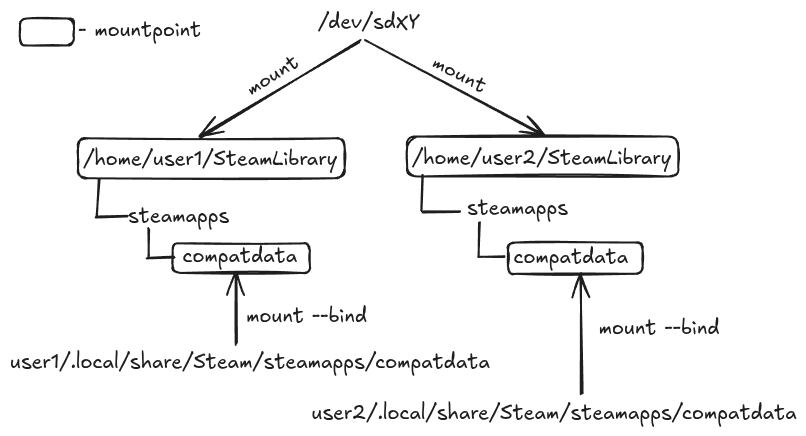
The most persistent and reliable fix is to get the SteamLibrary on a separate partition and mount it for each user you want to share it with, I mounted mine to ~/.steam/SteamLibrary for each user. Then you can
mount --bind ~/.steam/steam/steamapps/compatdata ~/.steam/SteamLibrary/steamapps/compatdataSo that you write prefixes to your user directory instead of writing them to the shared library. Do the same for every user and don’t forget to add that to fstab, it would look like
/home/damglador/.steam/steam/steamapps/compatdata /home/damglador/.steam/SteamLibrary/steamapps/compatdata none bind 0 0Replace my username with yours and copy that for every user, change the path if necessary.
The layout would look something like this
You can also use btrfs subvolumes for each compatdata folder if you want to. But you can not bind mount the main library folder from one location, or symlink it, as it won’t allow overlaying the compatdata folder.